
Run your counter and online shop from one platform

Sell in store and online from one place. One catalog, live inventory, and payments built in — every sale stays in sync.

M-Pesa — Paybill and Till number supported

Pay for your plan · we add 7 free bonus days before billing starts · Features

Save 15% when you pay yearly

Standard

POS and stock for one shop — sell and track inventory today.

KES 850

/ month

KES 1,000monthly billingKES 10,200 billed yearly · save 15%

1 outlet · 3 staff · 1 warehouse

This plan includes

  • Online & offline POS
  • Catalog & basic inventory
  • Manual M-Pesa logging
  • Restaurant / café POS
  • Customer CRM lite
  • Daily sales summaries
  • Barcode scanning toggle

Per month · billed yearly

KES 850
Choose Standard
Most popular

Growth

Open your digital shop — same stock as the counter.

KES 1,275

/ month

KES 1,500monthly billingKES 15,300 billed yearly · save 15%

3 outlets · 10 staff · 2 warehouses

This plan includes

  • Everything in Standard
  • Subdomain storefront
  • Themes & guest checkout
  • WhatsApp cart share
  • Delivery zones & fulfillment SMS
  • Admin-assisted phone sales

Per month · billed yearly

KES 1,275

Get started · 7 bonus days

Enterprise

Multi-branch, STK Push, booking, and margin reports.

KES 2,550

/ month

KES 3,000monthly billingKES 30,600 billed yearly · save 15%

Unlimited outlets · Unlimited staff · Unlimited warehouses

This plan includes

  • Everything in Growth
  • Custom domain + SSL
  • Merchant Daraja STK Push
  • IBT, batches, stock takes, suppliers
  • Appointments & workshop job cards
  • COGS, forecast & AI assistant
  • Priority support

Per month · billed yearly

KES 2,550

Choose Enterprise

Solutions

Built for your kind of shop

See all verticals →

How it works

How will 360.imobi work with your business?

Set up your shop, sell at the counter, keep stock straight, and take M-Pesa — then open online when you are ready.

Try demo
1

Step 1 of 6

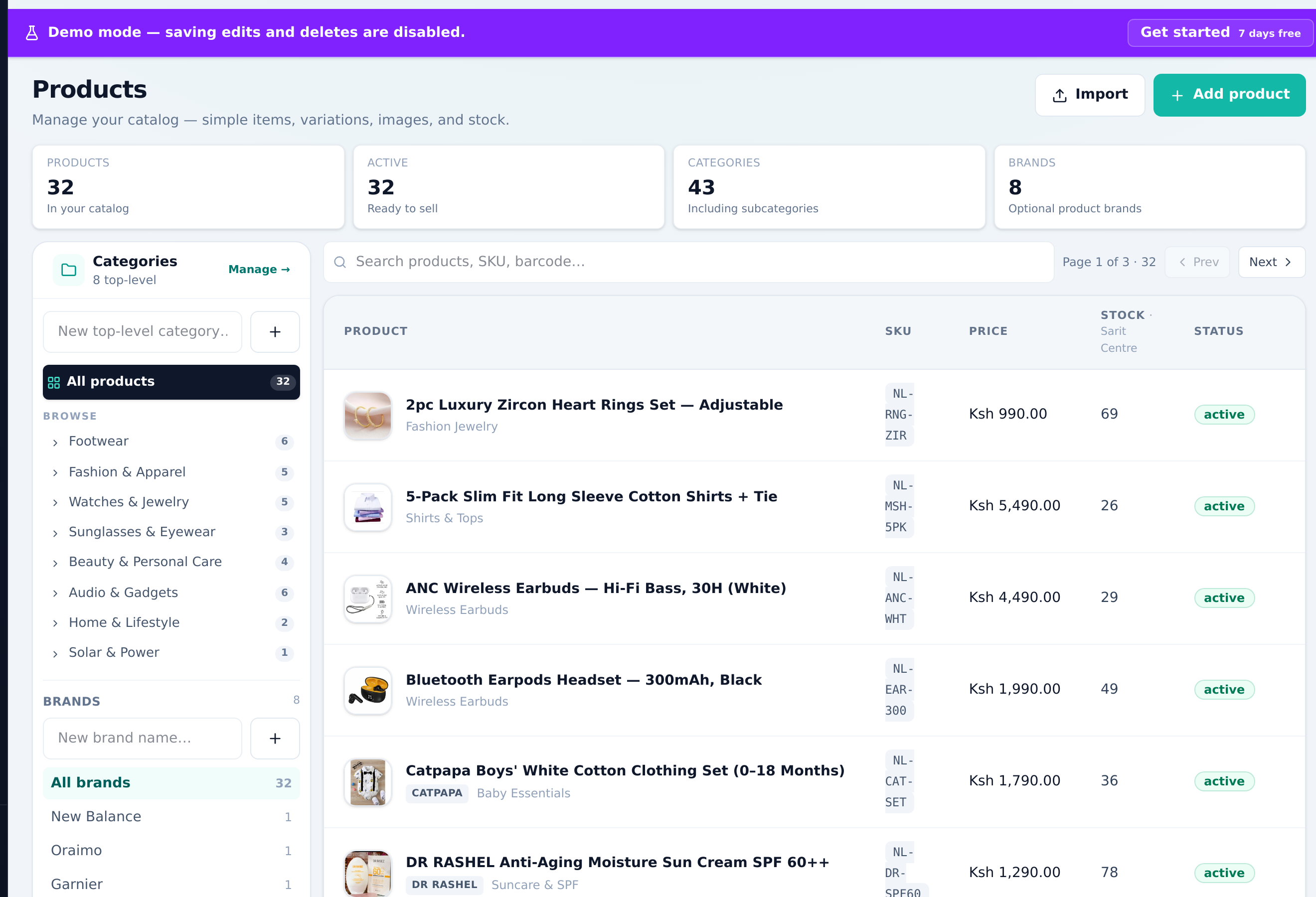
Setup your business

app.360.imobi.co.ke/products
Setup your business

Add your catalog, outlets, and staff. Barcode scanning is a setting — not a paid add-on.

  • Outlets & staff
  • Catalog & variants
  • Opening stock
2

Step 2 of 6

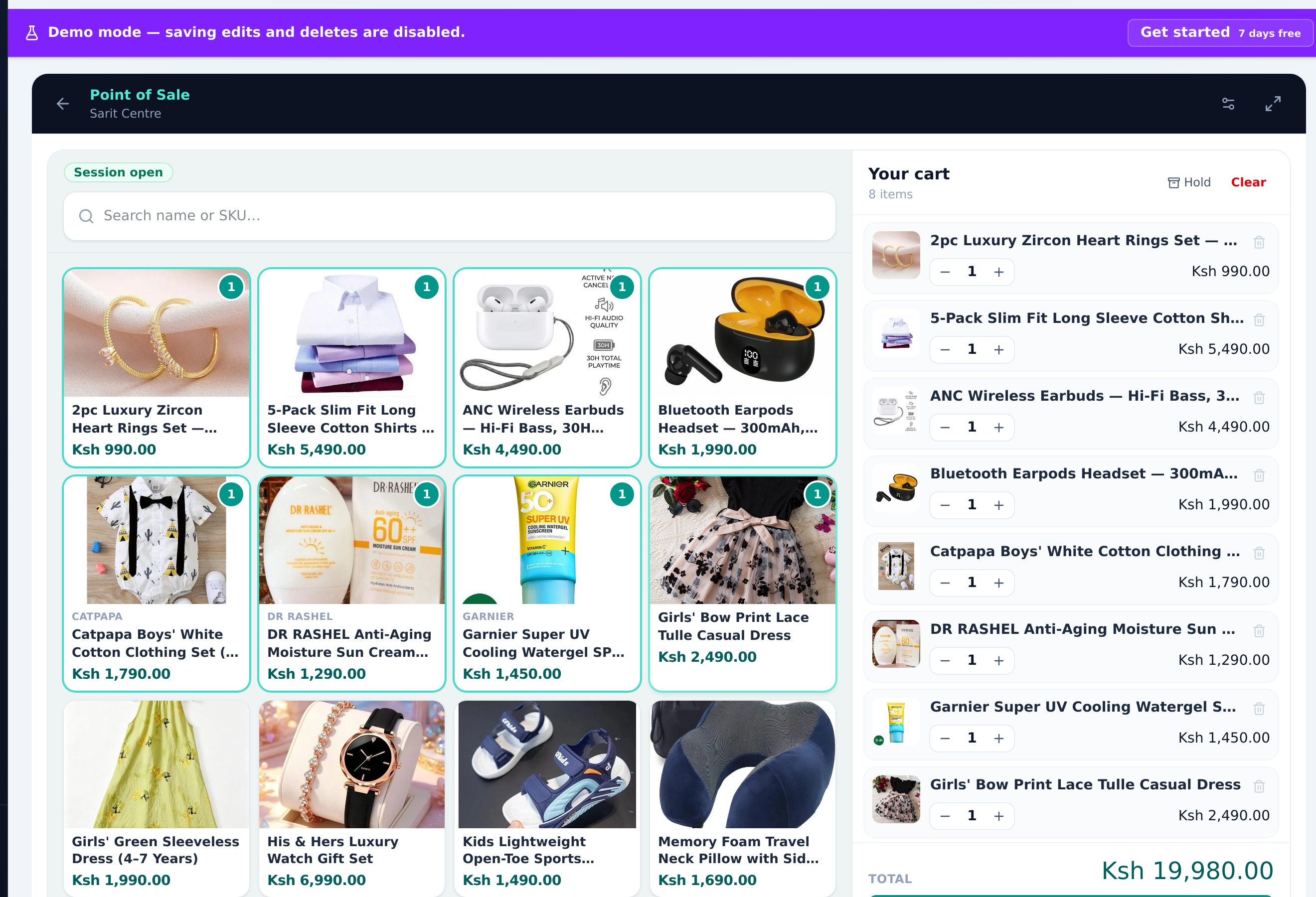
Sell at the counter

app.360.imobi.co.ke/pos
Sell at the counter

Fast POS with cash, card notes, and M-Pesa logging. Sessions, float, and end-of-day summaries — keep selling offline when the network drops.

  • Fast checkout
  • Offline-ready POS
  • Sessions & float
3

Step 3 of 6

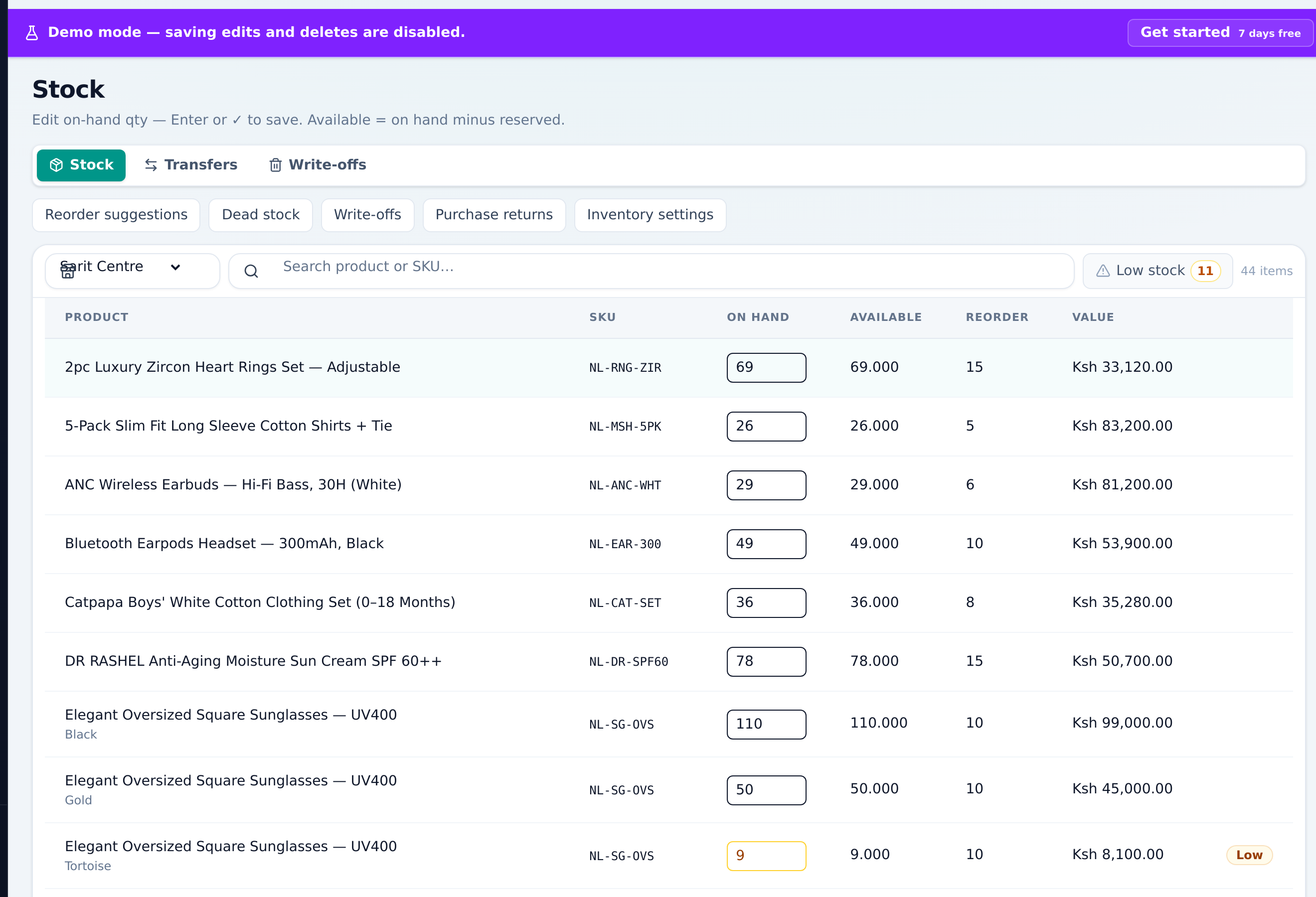
Control your stock

app.360.imobi.co.ke/inventory
Control your stock

One inventory for the counter and the online shop. Adjustments with an audit trail; Enterprise unlocks batches, serials, stock takes, and inter-branch transfers.

  • Shared stock truth
  • Adjustments
  • Low-stock alerts
4

Step 4 of 6

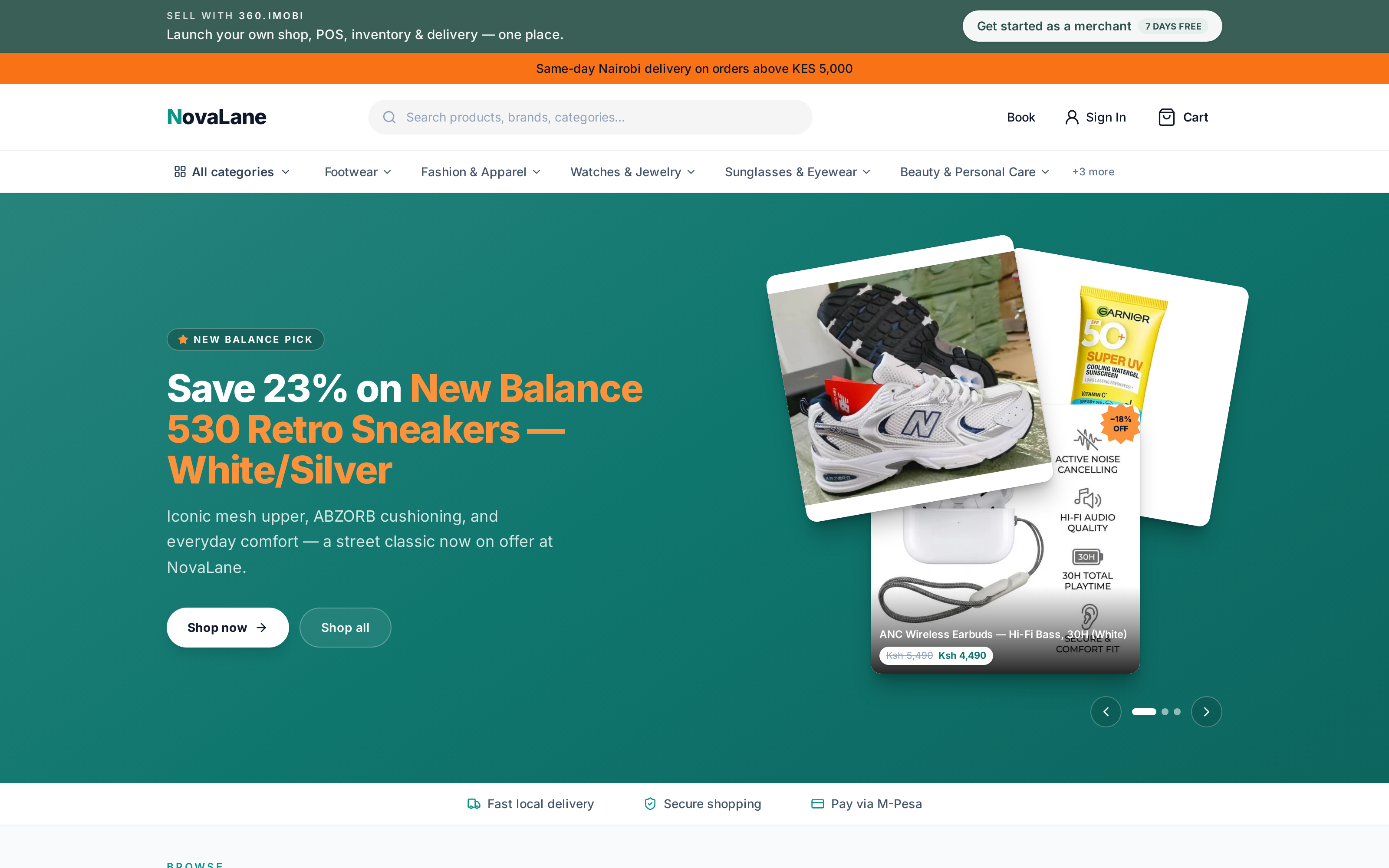
Open your online shop

phonestore.com
Open your online shop

Growth unlocks a subdomain storefront with live stock, WhatsApp cart share, assisted checkout, and delivery zones — same numbers as the counter. Enterprise can go custom, e.g. phonestore.com.

  • Subdomain shop
  • WhatsApp carts
  • Assisted checkout
5

Step 5 of 6

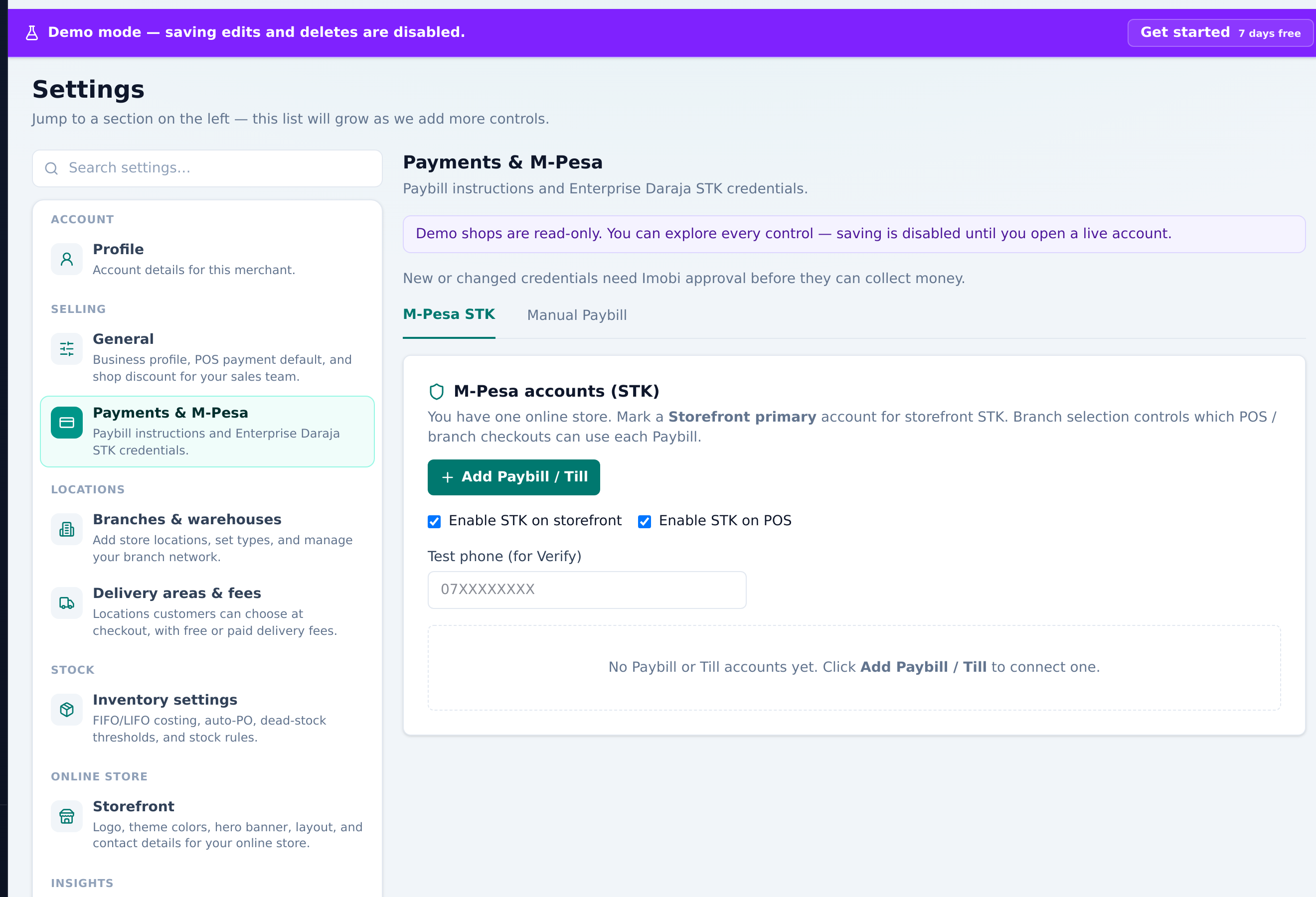
Get paid the local way

app.360.imobi.co.ke/settings/payments
Get paid the local way

Log Paybill or Till numbers on every plan. Enterprise adds Daraja STK Push to the customer’s phone — same order pipeline in-store and online.

  • Cash & card notes
  • M-Pesa paybill
  • STK Push · Enterprise
6

Step 6 of 6

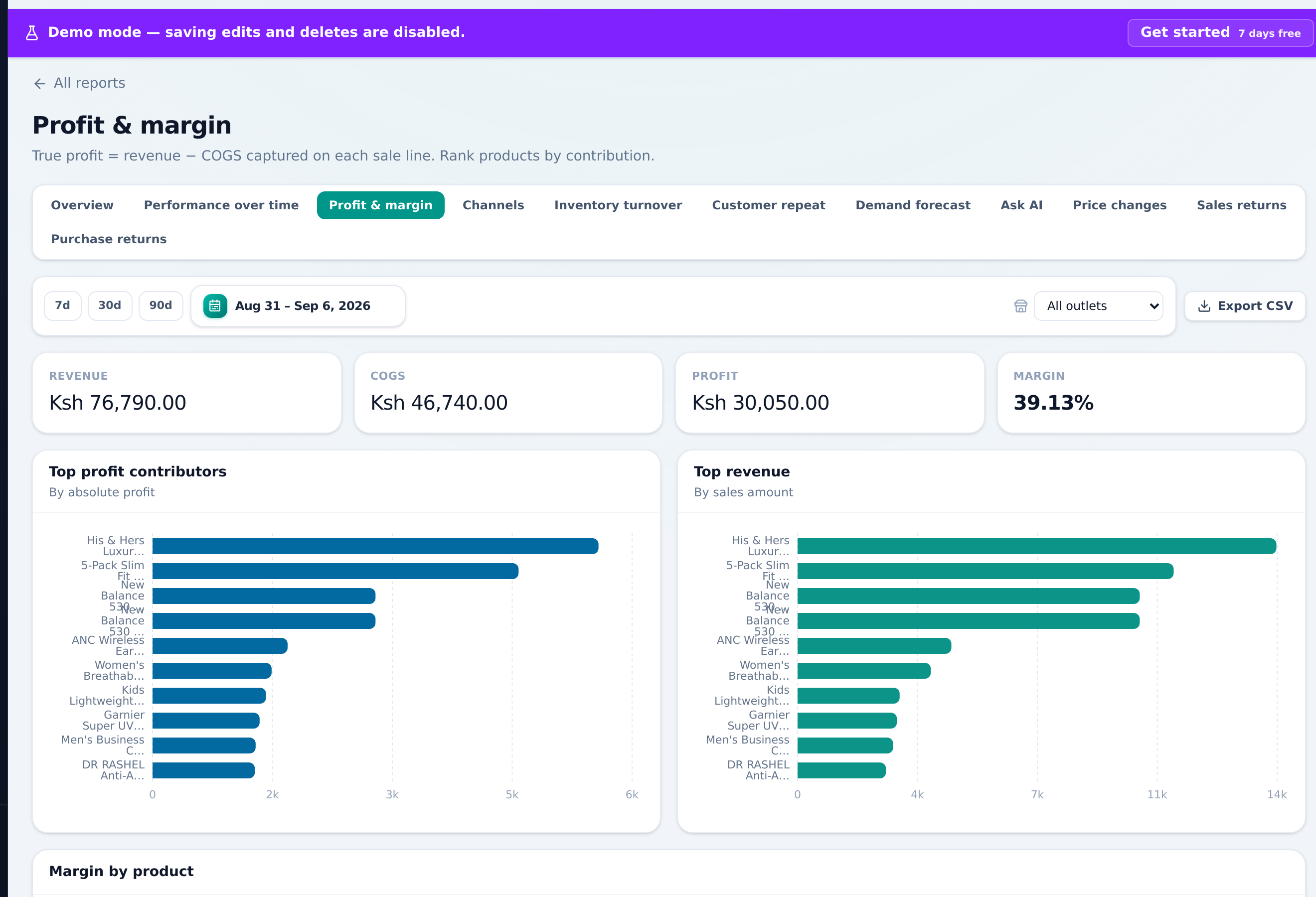
See true profit

app.360.imobi.co.ke/reports/profit
See true profit

Enterprise reports show COGS and margin by product and channel. Forecast reorder suggestions and ask natural-language questions over your own data.

  • COGS & margin
  • Channel reports
  • Forecast
M-Pesa Paybill
M-Pesa STK Prompt
Cash
Bank Integration
Offline payment
Credit

Payment methods & gateways

Built for how customers actually pay — at the counter and on your storefront.

Log paybill references on every plan. STK Push lets customers confirm on their phone — same order pipeline in-store and online.

  • M-Pesa Paybill
  • M-Pesa STK Prompt
  • Cash
  • Bank Integration
  • Offline payment
  • Credit

Why merchants choose 360.imobi

POS & back-office

Counter sales, sessions, catalog, and inventory — the core every merchant needs.

Ecommerce storefront

Growth unlock: your online shop with live stock, WhatsApp carts, and delivery.

One inventory

Sell in-store and online from the same numbers. No spreadsheet reconciliation.

M-Pesa ready

Log Paybill at checkout on every plan; STK Push so customers confirm on their phone.

Get started in four steps

  1. 01

    Sign up & pay — 7 bonus days free

  2. 02

    Set up shop, outlets & catalog

  3. 03

    Sell at the counter with POS

  4. 04

    Open storefront when ready

Start signup

Support

Real support for real shops

Reach a person who understands counter rush, stock counts, and M-Pesa hiccups — not a ticket black hole.

Mon–Sat · 8:00–18:00 EAT

FAQ

Straight answers, plain language

The questions merchants ask before they switch POS — answered without the jargon.

Still unsure? Chat on WhatsApp
Do I buy the software, or subscribe?

You subscribe. 360.imobi is a hosted service — we run the servers, security, and updates. You log in, set up your shop, and sell. There is no source-code purchase or install on your own machine.

Can I use POS without an online shop?

Yes. Standard covers POS, catalog, and stock for one shop. Growth adds your online storefront (same stock as the counter). You can start selling in-store and open online when you are ready.

How does M-Pesa work?

On every plan you can log Paybill or Till numbers at checkout. STK Prompt (customer confirms on their phone) is available when you need it. Cash, bank, offline payment, and credit are supported too — so you match how your customers actually pay.

What are the 7 free bonus days?

You pay for your plan when you sign up. We then add 7 free bonus days before your paid period starts. It is not a separate free trial — you choose a plan, pay, and get those extra days on top.

What if the internet drops during a sale?

The POS is built to keep selling when the connection is weak or offline. Sales sync when you are back online, so a busy counter does not stop for a network blip.

How do I get help?

WhatsApp, phone, or email during Mon–Sat · 8:00–18:00 EAT. Write to support360@imobi.co.ke or use the contacts on this page — real people who understand shops, not a ticket void.

Start selling in minutes

Pay for your plan first — we add 7 free bonus days before your billing period starts.

Need help?

WhatsApp